HTTP event stream
Description
The HTTP event stream channel accepts GET requests on a certain URL. It sends a potentially infinite sequence of JSON objects as response of a HTTP GET request.
The response objects are created from Events in a Signal queue. So there must be an Orchestra process which regularly sends signals to that queue.
The user configures a timeout value. If for this time no events are available in the queue the response stream is closed.
The channel also accepts requests where the client requires an update of the connection to a web socket. In this case the JSON objects are sent as text messages over the web socket.
Creation
To create a HTTP event stream channel, follow the steps described in the general description of [Start elements].
Configuration
-
Authentication and authorization configure the authentication mechanism and the ncessary roles the user must have.
-
Signal queue the Signal queue from where the channel shall read events.
The channel translates events to JSON objects and writes them into the response stream. The JSON object doesn't contain newlines. -
Queue timeout The channel waits for this time span for new signals in the queue.
If for this time no events are available in the queue the response stream is closed. -
Content-Type The Content-Type of the response.
You should normally use text/event-stream or application/x-ndjson, application/stream+json . -
Record prefix Optional prefix for each record in the response data.
Typically something likedata:. -
Record terminator Terminates each JSON object in the response data.
You may use \n, \r, \t and \f to denote newline, carriage return, tabulator and formfeed characters.
The default value is\n.
Example
If you create a HTTP event stream channel named GET Stream and you configure the channel like
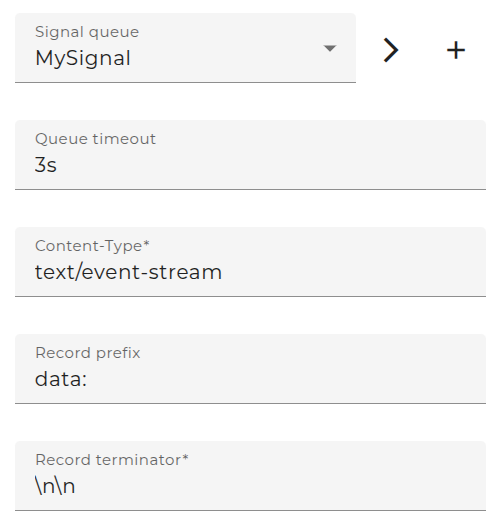
and there is a process model which repeatedly sends signals to the queue MySignal,
then you can invoke a GET with your browser on http://localhost:8819/Orchestra/d9dd7a1a-e9a4-4292-b683-787689cbc56f/33/GET_Stream
and you will receive a stream of JSON events similar to
data: {"ident":11,"ts":"2026-02-11T13:08:03.599+01:00","value":111,"msg1":{"name":"name11","ival":34.54},"msg2":{"name":"name11","ident":11}}

data: {"ident":12,"ts":"2026-02-11T13:08:05.633+01:00","value":112,"msg1":{"name":"name12","ival":37.68},"msg2":{"name":"name12","ident":12}}

data: {"ident":13,"ts":"2026-02-11T13:08:07.675+01:00","value":113,"msg1":{"name":"name13","ival":40.82},"msg2":{"name":"name13","ident":13}}

data: {"ident":14,"ts":"2026-02-11T13:08:09.723+01:00","value":114,"msg1":{"name":"name14","ival":43.96},"msg2":{"name":"name14","ident":14}}

data: {"ident":15,"ts":"2026-02-11T13:08:11.761+01:00","value":115,"msg1":{"name":"name15","ival":47.1},"msg2":{"name":"name15","ident":15}}
Note that the client can request an update to a web socket. In this case the channel will send the lines as text events over the web socket.